Our Verdict
Optoma GT1080HDRx Wins
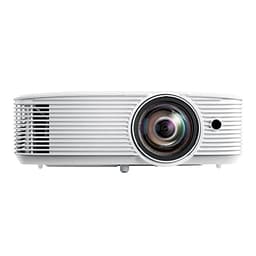
It offers significantly higher brightness at 3800 lumens compared to BenQ's 3000 lumens, alongside a guaranteed ultra-low 8.4ms input lag for smoother 120Hz gaming, all for a marginal price difference of $21. Its HDR support and 15,000-hour lamp life further solidify its value. The BenQ TH671ST is a better pick for those prioritizing a slightly lower initial cost and auto vertical keystone adjustment, especially if their setup is less permanent and needs frequent minor corrections.
Bottom Line: Optoma GT1080HDRx is the better choice. It offers significantly higher brightness at 3800 lumens compared to BenQ's 3000 lumens, alongside a guaranteed ultra-low 8.
In-Depth Analysis
How they compare in practice
The Optoma GT1080HDRx and BenQ TH671ST both aim to provide an immersive gaming experience through short-throw projection and 1080p native resolution. However, the Optoma distinguishes itself with a significant brightness advantage, pushing 3800 ANSI lumens compared to the BenQ's 3000 lumens. In practical terms, this means the Optoma will deliver a noticeably brighter and more vibrant image, especially in rooms with some ambient light, making it more versatile for day and night gaming sessions without needing full blackout conditions. The BenQ, while still bright, will require a darker environment to achieve comparable image pop.
For dedicated gamers, input lag is paramount. The Optoma explicitly advertises an ultra-low 8.4ms input lag for 1080p 120Hz gameplay, a concrete figure that promises incredibly responsive action. While the BenQ also claims "low input lag," the absence of a specific metric makes it less reassuring for competitive players who demand precise timing. Furthermore, the Optoma's inclusion of HDR support with 4K UHD input capability, even with a native 1080p panel, means it can process and display a wider color gamut and greater contrast for compatible content, enriching the visual fidelity of games and movies beyond what the BenQ offers.
The long-term value proposition also favors the Optoma, despite its slightly higher $970 price tag compared to the BenQ's $949. The Optoma's impressive 15,000-hour lamp life significantly extends the period before a lamp replacement is needed, reducing total cost of ownership. The BenQ does not specify its lamp life, but typically, standard projector lamps range from 4,000-10,000 hours. While both are short-throw projectors, Optoma's ability to project a large image from just 4 feet provides more flexibility in tighter spaces. The BenQ's auto vertical keystone offers a minor convenience for initial setup, but this is often a one-time adjustment.
Ultimately, the Optoma GT1080HDRx offers a more premium and robust gaming and entertainment package, delivering superior brightness, confirmed ultra-low input lag, HDR support, and a longer lamp life for a negligible price increase. The BenQ remains a solid choice for those who value initial cost savings and simpler setup features over the Optoma's enhanced performance metrics. The trade-off lies between raw performance and slight setup convenience, with Optoma clearly winning on performance.
Key Differences
The most significant spec differences at a glance
Brightness Ansi Lumens
21% lessAdvantages
Where each product wins

Optoma
- Brightness Ansi Lumens: 21% higher (3000 vs 3800)
Which to Pick for Your Situation
Concrete scenarios with a clear recommendation
For a dedicated gaming setup where every millisecond counts
OptomaThe Optoma GT1080HDRx explicitly offers an 8.4ms input lag for 120Hz gameplay, ensuring maximum responsiveness for competitive gamers.
For use in a living room with some ambient light
OptomaThe Optoma provides a brighter 3800 ANSI lumens, which helps maintain image vibrancy and clarity even when the room isn't completely dark.
For a budget-conscious buyer looking for the best value without extreme priorities
BenQThe BenQ TH671ST costs slightly less at $949 and still delivers native 1080p resolution and a bright 3000 lumens, offering solid performance for its price.
For easy initial setup in varying environments
BenQThe BenQ TH671ST features auto vertical keystone correction, simplifying alignment and making it quicker to get a properly squared image.
Who Should Buy Which?
Find the right product for your needs

Buy BenQ if...
BenQ TH671ST | 1080p
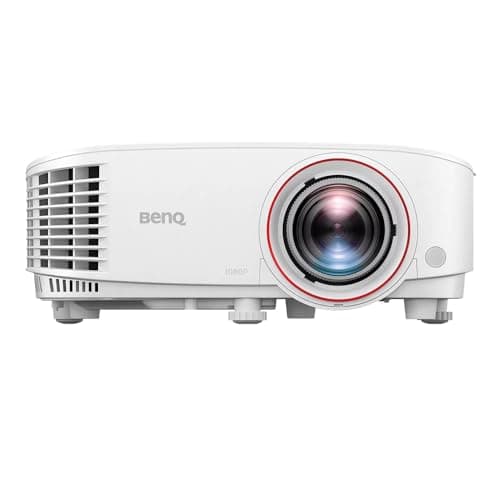
The BenQ TH671ST is the ideal choice for a home entertainment enthusiast or casual gamer who prioritizes a strong balance of clear visuals, ample brightness, and straightforward setup, all while being mindful of their initial budget. This buyer might be setting up their projector in a multi-purpose living space or a dedicated media room where perfect light control isn't always feasible but they aim for quality. They appreciate the native 1080p resolution for crisp, detailed images whether watching movies or playing games, and find the 3000 ANSI lumens bright enough for enjoyable viewing in moderately darkened rooms. A key feature for them is the auto vertical keystone, which simplifies initial setup and makes minor image adjustments hassle-free, especially if the projector isn't permanently mounted. While they enjoy responsive gameplay, they aren't necessarily a competitive esports player chasing every single millisecond of input lag, making BenQ's general "low input lag" more than sufficient for their needs. They are willing to forgo advanced features like HDR support, a higher brightness output, and a numerically specified ultra-low input lag in favor of a slightly lower $949 price point and the projector's user-friendly nature. This buyer seeks reliable, quality big-screen entertainment without overspending on premium gaming-specific enhancements they might not fully utilize or notice.

Buy Optoma if...
Optoma GT1080HDRx Short Throw
The Optoma GT1080HDRx is perfectly suited for the serious gamer and home cinema enthusiast who demands top-tier performance and visual fidelity without stretching into 4K projector price ranges. This buyer's priority is an incredibly responsive and immersive experience, making the ultra-low 8.4ms input lag at 1080p 120Hz a non-negotiable feature for competitive advantage in fast-paced titles. They desire a vibrant, punchy image even when complete darkness isn't achievable, hence the 3800 ANSI lumens brightness is a significant draw, allowing for more flexible viewing times. The inclusion of HDR support with 4K UHD input processing also appeals to their desire for richer colors and deeper contrast in compatible games and movies, elevating the overall visual experience beyond standard 1080p. While slightly more expensive at $970, the extended 15,000-hour lamp life offers peace of mind and reduces long-term maintenance costs, reflecting a value-conscious approach to premium performance. This user is prepared to manage without auto keystone, prioritizing raw performance metrics and advanced visual technologies over minor setup conveniences.
Spec Comparison
10 specs compared
| Specification |  |  |
|---|---|---|
| Price | $949 | $970 |
| Rating | 4.4(843) | 4.2(862) |
| Brightness Ansi Lumens | 3000 | 3800 |
| Native Resolution | 1080p | 1080p |
| Gaming Input Lag Ms | — | 8.4 |
| Throw Ratio | 0.69 | — |
| Keystone Correction | Vertical | — |
| Hdmi Ports | — | 2 |
| Hdr Support | — | Yes |
| Light Source | — | Bulb (lamp) |
| Contrast Ratio | — | 50000:1 |
| Lamp Life Hours | — | 15000 hrs |
Swipe horizontally to see all columns
Pros & Cons
Quick overview of strengths and weaknesses
BenQ TH671ST |
- Native 1080p resolution for clear images.
- 3000 lumens provides bright picture.
- Low input lag for responsive gaming.
- Projects 100-inch image from 5 feet.
- Lacks horizontal keystone adjustment.
- Integrated speaker typically offers low fidelity.
Optoma GT1080HDRx Short
- Low input lag 8.4ms for 120Hz gaming
- Short throw projects large image from 4ft
- 3800 lumens for bright images
- 15,000 hours lamp life
- Lamp light source requires eventual replacement
- Native resolution is 1080p, not 4K
- Only two HDMI ports
Frequently Asked Questions
Common questions about this comparison
Which projector is brighter for daytime viewing?
The Optoma GT1080HDRx is significantly brighter with 3800 ANSI lumens, compared to the BenQ TH671ST's 3000 lumens. This makes the Optoma better suited for rooms with ambient light.
What is the gaming input lag difference between these two projectors?
The Optoma GT1080HDRx specifies an ultra-low 8.4ms input lag at 1080p 120Hz, ideal for competitive gaming. The BenQ TH671ST also offers low input lag, but a specific numerical value isn't provided.
Does either projector support HDR content?
Yes, the Optoma GT1080HDRx supports HDR with 4K UHD input capability, enhancing color depth and contrast. The BenQ TH671ST does not list HDR support.
Which projector has a longer lamp life?
The Optoma GT1080HDRx boasts an impressive lamp life of up to 15,000 hours, offering extended use before replacement. BenQ's lamp life information is not specified in its product details.
Is either projector better for small rooms?
Both are short-throw projectors, good for small spaces. The Optoma can project a large image from as close as 4 feet, while the BenQ can do a 100-inch image from 5 feet.
Related Comparisons
Similar products people compare
BenQ vs ViewSonic
$949 vs $1350
Epson vs Optoma
$830 vs $970
Optoma vs Optoma
$970 vs $999
HAPPRUN vs BenQ
$380 vs $949
Optoma vs ViewSonic
$970 vs $1350
BenQ vs Optoma
$949 vs $999
BenQ vs Epson
$949 vs $830
BenQ vs Yaber PROJECTOR
$949 vs $727
BenQ vs Optoma
$949 vs $899
Optoma vs Yaber PROJECTOR
$970 vs $727
BenQ vs Optoma
$1599 vs $970
Explore Other Categories
Popular comparisons across the site





Ask AI
Get instant answers about specs
Get the Deets
Ask our AI assistant
Ask Deets anything!