Our Verdict
TONOR TD510 AIR S H+ Wins
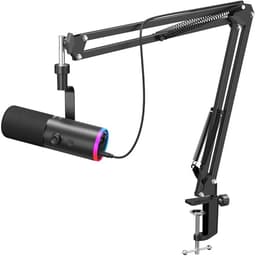
At a lower price of $39.99, it offers superior versatility with dual USB/XLR connection and crucial zero-latency monitoring, features the HyperX SoloCast 2 lacks. Its AI noise cancellation is a significant advantage for streamers and gamers in varied environments, providing a cleaner audio feed. The HyperX SoloCast 2 is the better pick for users strictly prioritizing raw audio resolution, offering 24-bit/96kHz capture compared to TONOR's 48kHz, and values a simpler, high-fidelity setup.
Bottom Line: TONOR TD510 AIR S H+ is the better choice. At a lower price of $39.
In-Depth Analysis
How they compare in practice
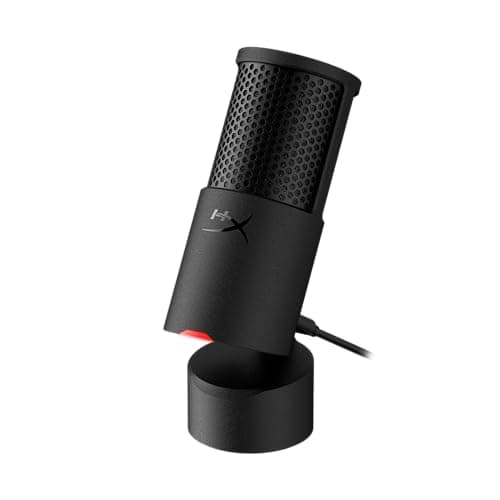
The HyperX SoloCast 2 and TONOR TD510 AIR S H+ both cater to the gaming and streaming market, but they approach the challenge with distinct priorities. The SoloCast 2 champions pristine audio capture, boasting a 24-bit/96kHz sample rate, which translates to a richer, more detailed sound profile. For aspiring voice actors, podcasters, or streamers in acoustically treated spaces, this higher fidelity is a clear advantage. Its integrated pop filter and internal shock mount are crucial for maintaining clean audio by mitigating plosives and handling noise, ensuring a professional sound without needing additional accessories.
Conversely, the TONOR TD510 AIR S H+ focuses on practical features and versatility for the dynamic world of live gaming and streaming. Its dual USB/XLR connection provides significant flexibility, allowing users to start with a simple USB setup and upgrade to an XLR audio interface later for more advanced control. The inclusion of zero-latency monitoring via a 3.5mm headphone jack is indispensable for live applications, enabling streamers to hear their voice in real-time without distracting delays. Furthermore, its AI noise cancellation feature is a game-changer for those in noisy home environments, effectively suppressing keyboard clicks, fan hum, and background chatter that could otherwise detract from the stream quality.
While the SoloCast 2 offers a higher sample rate and dedicated HyperX NGENUITY software for minor adjustments, its USB-only connection and lack of real-time monitoring can be limiting for live content creators. The TONOR, despite a lower 48kHz sample rate, compensates with features that directly impact the live broadcasting experience, such as gain control and a tap-to-mute button, all at a more accessible $39.99 price point. The trade-off is often between raw audio purity (HyperX) and feature-rich utility for live performance (TONOR).
Key Differences
The most significant spec differences at a glance
Sample Rate
100% moreAdvantages
Where each product wins

HyperX
- Sample Rate: 100% higher (96.0 vs 48.0)
Which to Pick for Your Situation
Concrete scenarios with a clear recommendation
For a streamer in a noisy home environment
TONORThe TONOR TD510 AIR S H+ features AI noise cancellation, effectively reducing background sounds like keyboard clicks or fan noise during live broadcasts.
For aspiring podcasters prioritizing studio-quality recording
HyperXThe HyperX SoloCast 2 records high-resolution 24-bit/96kHz audio, delivering superior clarity and detail for voice recordings.
For gamers who need to monitor their voice in real-time
TONORThe TONOR TD510 AIR S H+ offers zero-latency monitoring via a 3.5mm headphone jack, allowing immediate self-feedback without delay.
For users seeking future-proofing with professional audio connections
TONORWith both USB and XLR outputs, the TONOR TD510 AIR S H+ provides flexibility for connecting to various audio interfaces and setups.
Who Should Buy Which?
Find the right product for your needs

Buy HyperX if...
HyperX SoloCast 2 –
The HyperX SoloCast 2 is the ideal choice for content creators who prioritize audio fidelity and a straightforward, high-quality recording experience above all else. This buyer is likely an aspiring podcaster, voice-over artist, or a streamer operating in a controlled environment where background noise is minimal. They value crystal-clear vocals and appreciate the 24-bit/96kHz audio resolution for capturing every nuance of their voice. They are looking for a reliable, plug-and-play solution that sounds excellent straight out of the box, benefiting from the integrated pop filter and internal shock mount that reduce unwanted noise without needing extra gear. They might already have a preferred headphone setup and don't require the microphone to handle real-time monitoring. While they are mindful of budget, they are willing to pay slightly more for the superior audio capture specs, knowing they are getting professional-grade sound for their projects and don't need the extensive feature set or dual connectivity of more complex microphones.

Buy TONOR if...
TONOR Dynamic Gaming Microphone,
The TONOR TD510 AIR S H+ is perfectly suited for the dynamic streamer, online gamer, or casual content creator who operates in a less-than-ideal acoustic environment and values versatility, real-time control, and noise reduction features. This buyer needs a microphone that can adapt to various setups, appreciating the dual USB/XLR connection for current use with a PC and future expansion with an audio interface. Crucially, they demand zero-latency monitoring via the 3.5mm headphone jack to hear their own voice without delay during live streams, enhancing their performance. The AI noise cancellation is a significant draw, as it allows them to maintain clear communication even with keyboard clatter, fan noise, or other ambient sounds in their room. They will also benefit from the integrated gain control and tap mute button for immediate adjustments. This buyer is budget-conscious and seeks maximum functionality and features for their investment, even if it means a slightly lower sample rate than more specialized recording mics.
Spec Comparison
10 specs compared
| Specification |  |  |
|---|---|---|
| Price | $45 | $40 |
| Rating | 4.7(554) | 4.5(676) |
| Sample Rate | 96 kHz | 48 kHz |
| Bit Depth | 24 | — |
| Connection | USB | USB/XLR |
| Polar Pattern | Cardioid | — |
| Zero-Latency | — | Yes |
| Mute Button | Yes | Yes |
| Model Number | AR0A0AA | TD510 Air S H+ |
| Software | HyperX NGENUITY | None |
| Gain Control | — | Yes |
| Headphone Out | — | Yes |
Swipe horizontally to see all columns
Pros & Cons
Quick overview of strengths and weaknesses
HyperX SoloCast 2
- Records high-res 24-bit/96kHz audio.
- Tap-to-mute with LED status indicator.
- Integrated pop filter minimizes plosives.
- Internal shock mount reduces handling noise.
- Single cardioid polar pattern limits use cases.
- USB connection restricts pro audio interface use.
- Included stand has limited height adjustment.
TONOR Dynamic Gaming
- AI noise cancellation reduces background sound.
- Dual USB/XLR outputs for flexible connections.
- Zero-latency monitoring via 3.5mm headphone jack.
- Integrated volume control and tap mute button.
- No dedicated software for advanced mic settings.
- RGB lighting provides no functional utility.
Frequently Asked Questions
Common questions about this comparison
Which microphone offers higher audio resolution?
The HyperX SoloCast 2 records at 24-bit/96kHz, offering higher resolution audio capture compared to the TONOR TD510 AIR S H+'s 48kHz sample rate.
Can I connect either microphone to a professional audio interface?
The TONOR TD510 AIR S H+ supports both USB and XLR connections, making it compatible with audio interfaces. The HyperX SoloCast 2 is USB-only.
Does either microphone include active noise cancellation?
Yes, the TONOR TD510 AIR S H+ features AI noise cancellation to reduce background sounds. The HyperX SoloCast 2 relies on its cardioid pattern and internal shock mount.
Do these microphones require dedicated software for settings?
The HyperX SoloCast 2 utilizes HyperX NGENUITY software for advanced filters. The TONOR TD510 AIR S H+ does not come with dedicated software for settings.
Which mic allows me to hear my voice instantly without delay?
The TONOR TD510 AIR S H+ provides zero-latency monitoring through its built-in 3.5mm headphone jack, a feature absent in the HyperX SoloCast 2.
Related Comparisons
Similar products people compare
HyperX vs MAONO
$45 vs $40
HyperX vs Movo
$45 vs $40
HyperX vs Razer
$45 vs $40
HyperX vs TONOR
$45 vs $32
FIFINE vs HyperX
$57 vs $45
TONOR vs ZealSound
$40 vs $35
Movo vs TONOR
$40 vs $40
AKG vs TONOR
$40 vs $40
Razer vs TONOR
$40 vs $40
MAONO vs TONOR
$40 vs $40
TONOR vs MAONO
$40 vs $46
FIFINE vs TONOR
$30 vs $40
FIFINE vs TONOR
$55 vs $40
FIFINE vs TONOR
$57 vs $40
TONOR vs TONOR
$40 vs $32
Explore Other Categories
Popular comparisons across the site


Ask AI
Get instant answers about specs
Get the Deets
Ask our AI assistant
Ask Deets anything!