Our Verdict
HyperX SoloCast 2 Wins
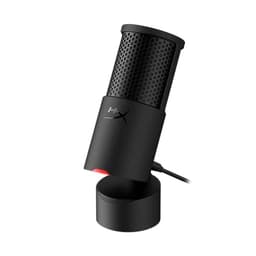
It delivers superior audio fidelity with 24-bit/96kHz sampling and a 24-bit depth, significantly outperforming the Razer Seiren V3 Mini's 48kHz capture for only a $5 price difference. The SoloCast 2 also includes an integrated pop filter and internal shock mount for cleaner audio out of the box. The Razer Seiren V3 Mini is the better pick for users needing aggressive background noise rejection in a noisy environment due to its supercardioid pattern and for those on the tightest budget, costing $39.99.
Bottom Line: HyperX SoloCast 2 is the better choice. It delivers superior audio fidelity with 24-bit/96kHz sampling and a 24-bit depth, significantly outperforming the Razer Seiren V3 Mini's 48kHz capture for only a $5 price difference.
In-Depth Analysis
How they compare in practice
The HyperX SoloCast 2 and Razer Seiren V3 Mini both offer compact, plug-and-play USB microphone solutions, but cater to slightly different priorities. The most significant divergence lies in their audio specifications: the HyperX SoloCast 2 boasts a 24-bit/96kHz sample rate, providing a much higher resolution audio capture compared to the Razer Seiren V3 Mini's 48kHz. This means the SoloCast 2 records more detailed, vibrant sound, offering greater flexibility for post-processing and a richer listening experience for streams, podcasts, or voiceovers. For content creators where audio quality is paramount, this spec delta is substantial, especially for a modest $5 price difference.
In real-world use, the HyperX also integrates a pop filter and an internal shock mount, directly addressing common audio issues like plosives and desk thumps without needing additional accessories. This contributes to a cleaner sound profile straight out of the box. The Razer, while featuring a built-in shock absorber, does not explicitly mention an integrated pop filter, potentially requiring users to purchase one separately for optimal vocal clarity.
However, the Razer Seiren V3 Mini does offer a distinct advantage with its supercardioid polar pattern. While the HyperX uses a standard cardioid pattern, the Razer's supercardioid design is more directional, excelling at isolating the speaker's voice and minimizing off-axis background noise. This makes the Seiren V3 Mini particularly well-suited for gamers or streamers operating in acoustically challenging environments, like a shared room or a setup prone to ambient sounds. The Razer's ultra-compact form factor is also a consideration for those with very limited desk space or who prioritize extreme portability, even though both are quite small.
Ultimately, the choice between them hinges on whether raw audio fidelity and integrated convenience (HyperX) or superior background noise rejection and ultra-compact design (Razer) takes precedence, all for a minimal price difference. For $44.98, the HyperX provides higher-quality sound capture, while the $39.99 Razer offers focused sound isolation at a slightly lower resolution.
Key Differences
The most significant spec differences at a glance
Sample Rate
100% moreAdvantages
Where each product wins

HyperX
- Sample Rate: 100% higher (96.0 vs 48)
Which to Pick for Your Situation
Concrete scenarios with a clear recommendation
For professional-grade voice recording or streaming
HyperXThe HyperX SoloCast 2 records at a superior 24-bit/96kHz, offering higher fidelity and more detailed audio than the Razer's 48kHz.
Gaming in a noisy shared room
RazerThe Razer Seiren V3 Mini features a supercardioid pickup pattern, which is more effective at rejecting background noise from the sides compared to a standard cardioid.
For users on the tightest budget
RazerAt $39.99, the Razer Seiren V3 Mini is slightly more affordable than the HyperX SoloCast 2's $44.98, while still providing essential features.
Prioritizing convenience with built-in noise reduction features
HyperXThe HyperX SoloCast 2 includes an integrated pop filter and an internal shock mount, minimizing plosives and handling noise without extra accessories.
Who Should Buy Which?
Find the right product for your needs

Buy HyperX if...
HyperX SoloCast 2 –
The ideal buyer for the HyperX SoloCast 2 is a budding content creator, streamer, or podcaster who prioritizes high-fidelity audio capture without breaking the bank. They are likely meticulous about sound quality and appreciate having more data to work with in post-production, making the 24-bit/96kHz sample rate a key selling point for them. This user values clarity and detail in their voice, whether for narration, singing, or general communication. They might operate in a relatively quiet environment and therefore don't need extreme background noise rejection. The integrated pop filter and internal shock mount are crucial for this buyer, as they want a clean, professional sound right out of the box, minimizing the need for additional accessories and simplifying their setup. While they are budget-conscious, they are willing to spend slightly more ($44.98) to gain a significant advantage in audio quality. They understand that while the stand might be basic, the core audio performance is where their investment truly pays off. They are giving up the hyper-focused noise rejection of a supercardioid pattern, which isn't essential for their typical use.

Buy Razer if...
Razer Seiren V3 Mini
The Razer Seiren V3 Mini is perfectly suited for the gamer or casual streamer who often finds themselves in a dynamic or somewhat noisy environment, such as a shared room, an open-plan living space, or where keyboard clicks and fan noise are common. Their primary concern isn't necessarily studio-grade audio fidelity, but rather ensuring their voice cuts through clearly without picking up excessive background chatter. The supercardioid polar pattern is a critical feature for this user, as it excels at focusing on the voice directly in front while aggressively rejecting sounds from the sides and rear, making them sound clearer in chaotic settings. They also value an ultra-compact design, perhaps due to limited desk space or the need for a discreet microphone that doesn't dominate their setup. This buyer is typically budget-conscious, making the $39.99 price point highly attractive. They are comfortable making adjustments via software like Razer Synapse and prioritize the "set it and forget it" simplicity for gaming sessions over extensive audio tweaking. They are giving up the higher resolution audio capture and integrated pop filter found in the HyperX, as their main goal is clear communication despite background noise.
Spec Comparison
8 specs compared
| Specification |  | 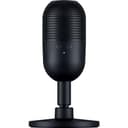 |
|---|---|---|
| Price | $45 | $40 |
| Rating | 4.7(554) | 4.6(904) |
| Sample Rate | 96 kHz | 48 kHz |
| Bit Depth | 24 | — |
| Connection | USB | USB |
| Polar Pattern | Cardioid | Cardioid |
| Mute Button | Yes | Yes |
| Model Number | AR0A0AA | RZ19-05050100-R3U1 |
| Software | HyperX NGENUITY | Razer Synapse |
| Gain Control | — | Yes |
Swipe horizontally to see all columns
Pros & Cons
Quick overview of strengths and weaknesses
HyperX SoloCast 2
- Records high-res 24-bit/96kHz audio.
- Tap-to-mute with LED status indicator.
- Integrated pop filter minimizes plosives.
- Internal shock mount reduces handling noise.
- Single cardioid polar pattern limits use cases.
- USB connection restricts pro audio interface use.
- Included stand has limited height adjustment.
Razer Seiren V3
- Condenser mic captures clear, detailed voice.
- Supercardioid pattern reduces background room noise.
- Tap-to-mute with LED prevents audio mishaps easily.
- Plug-and-play USB setup requires no drivers.
- Requires Razer Synapse for full audio adjustments.
- No physical gain control knob on the device.
- USB connection type offers limited interface options.
Frequently Asked Questions
Common questions about this comparison
What's the main difference in audio recording quality between the two microphones?
The HyperX SoloCast 2 offers superior 24-bit/96kHz audio recording, capturing more detail and fidelity. The Razer Seiren V3 Mini records at 48kHz, which is standard but less detailed.
Which microphone is better for reducing unwanted background noise?
The Razer Seiren V3 Mini, with its supercardioid polar pattern, is designed to be more directional and effective at isolating your voice while minimizing off-axis background sounds.
Do these microphones have a physical gain control knob?
Neither microphone features a physical gain control knob. Adjustments for both the HyperX and Razer models are primarily managed through their respective software suites.
Is a pop filter included with either microphone?
The HyperX SoloCast 2 features an integrated pop filter to reduce plosive sounds. The Razer Seiren V3 Mini does not explicitly mention an integrated pop filter.
How compact are these microphones for desk space?
Both are compact USB microphones, but the Razer Seiren V3 Mini is specifically marketed as "Ultra Compact," making it an excellent choice for minimal desk setups.
What software is needed for advanced adjustments?
The HyperX SoloCast 2 uses HyperX NGENUITY software for settings like high-pass/low-pass filters. The Razer Seiren V3 Mini requires Razer Synapse for full audio adjustments.
Related Comparisons
Similar products people compare
HyperX vs MAONO
$45 vs $40
HyperX vs Movo
$45 vs $40
HyperX vs TONOR
$45 vs $40
HyperX vs TONOR
$45 vs $32
FIFINE vs HyperX
$57 vs $45
MAONO vs Razer
$40 vs $40
Movo vs Razer
$40 vs $40
Razer vs TONOR
$40 vs $32
FIFINE vs Razer
$55 vs $40
FIFINE vs Razer
$26 vs $40
FIFINE vs Razer
$58 vs $40
Razer vs TONOR
$40 vs $40
FIFINE vs Razer
$57 vs $40
InnoGear vs Razer
$27 vs $40
Explore Other Categories
Popular comparisons across the site


Ask AI
Get instant answers about specs
Get the Deets
Ask our AI assistant
Ask Deets anything!