Our Verdict
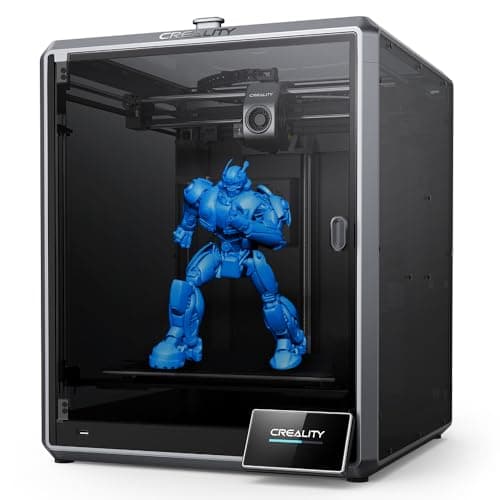
Comgrow Creality K1 Max Wins
It offers the same impressive 600mm/s print speed and a substantial 300x300x300mm build volume for nearly half the price ($719 vs $1299) of the K2 Plus. Its AI Lidar and auto-leveling ensure reliable first layers, making it an excellent value for high-speed, large-format printing. The Creality K2 Plus is the better pick for professionals demanding a larger 350x350x350mm build, multi-color capabilities, and high-temperature material printing, provided they can justify the significant additional investment.
Bottom Line: Comgrow Creality K1 Max is the better choice. It offers the same impressive 600mm/s print speed and a substantial 300x300x300mm build volume for nearly half the price ($719 vs $1299) of the K2 Plus.
In-Depth Analysis
How they compare in practice
When comparing the Comgrow Creality K1 Max and the Creality K2 Plus Combo, both printers stand out for their exceptional 600mm/s print speed, setting a high bar for rapid prototyping and efficient batch production in FDM 3D printing. However, their real-world applications and target users diverge significantly based on their feature sets and price points.
The most apparent difference lies in build volume and advanced capabilities. The K2 Plus boasts a larger 350x350x350mm print area, offering noticeably more room for truly massive single prints or a greater quantity of smaller parts in one go, compared to the K1 Max's still generous 300x300x300mm. Beyond size, the K2 Plus distinguishes itself with multi-color support, capable of printing up to 16 colors with additional CFS units. This feature transforms what’s possible for aesthetic designs, making it invaluable for product designers or hobbyists focused on vibrant, complex models. Furthermore, its enclosed chamber, 350°C nozzle, and 120°C bed temperatures enable it to print advanced, engineering-grade filaments like ABS, Nylon, or PC with superior adhesion and warp prevention, a realm where the K1 Max, while capable, is less specialized.
The K1 Max, conversely, shines through its value proposition and intelligent automation. Priced at $719, it delivers comparable speed and a large build volume for nearly half the K2 Plus's $1299 cost. Its core strength for the user is the integrated AI Lidar system which actively scans the first layer, practically eliminating common adhesion issues and ensuring consistent print starts. This translates to fewer failed prints and less material waste, significantly improving reliability for high-volume, single-color output. While the K2 Plus also features an AI camera for general monitoring, the K1 Max’s specific focus on first-layer success with Lidar offers a tangible, user-friendly benefit.
In essence, the K1 Max offers an incredibly robust and intelligent high-speed printing experience for a budget-conscious user focused on reliable, large-format single-color prints. The K2 Plus, while sharing the high-speed DNA, caters to a professional or prosumer audience willing to invest in an extensive feature set—larger volume, multi-color complexity, and advanced material compatibility—making it a more versatile, albeit more complex and expensive, tool for specialized applications.
Which to Pick for Your Situation
Concrete scenarios with a clear recommendation
For a budget-conscious user prioritizing speed and large volume
ComgrowThe Comgrow Creality K1 Max offers 600mm/s speed and a 300x300x300mm build volume for $719, providing excellent performance per dollar.
For professional designers needing multicolor capabilities
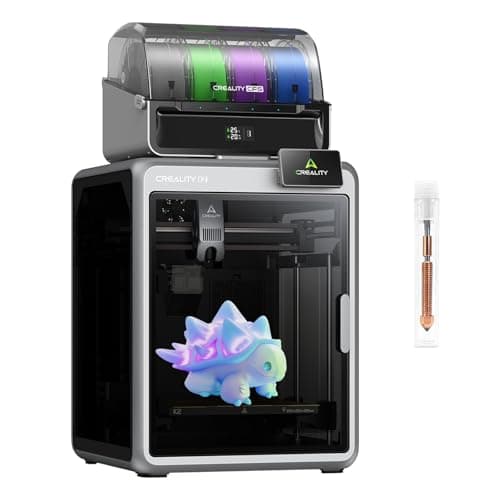
CrealityThe Creality K2 Plus Combo supports multicolor printing, allowing up to 16 colors with additional CFS units, crucial for intricate aesthetic designs.
For printing engineering-grade, high-temperature filaments
CrealityWith a 350°C max nozzle temp, 120°C max bed temp, and enclosed design, the Creality K2 Plus can handle advanced materials like ABS or PC more effectively.
For maximizing the size of a single functional part
CrealityThe Creality K2 Plus offers a larger 350x350x350mm build volume compared to the K1 Max's 300x300x300mm, accommodating bigger components.
Who Should Buy Which?
Find the right product for your needs

Buy Comgrow if...
Creality K1 Max 3D
The Comgrow Creality K1 Max is the ideal choice for an advanced hobbyist or a small business seeking high-speed, large-volume 3D printing capabilities without a premium budget. This buyer prioritizes efficiency and reliability for functional prototypes, larger models, or batch production. They need a printer that can churn out parts quickly at 600mm/s, significantly reducing project timelines, and offer a generous 300x300x300mm build volume for ambitious projects. The integrated AI Lidar system is a crucial draw, ensuring consistent first-layer adhesion and minimizing print failures, which translates to less wasted material and time. Priced at $719, the K1 Max provides exceptional value for its performance. This user may not require multi-color printing or the ability to print highly exotic engineering-grade filaments beyond standard ABS/PETG/PLA. They're willing to forego those niche features and the K2 Plus's slightly larger build space for a robust, fast, and intelligent printer that excels at its core function at a much more accessible price point. Their primary focus is on reliable, high-volume output of single-color parts.

Buy Creality if...
Creality K2 Plus Combo
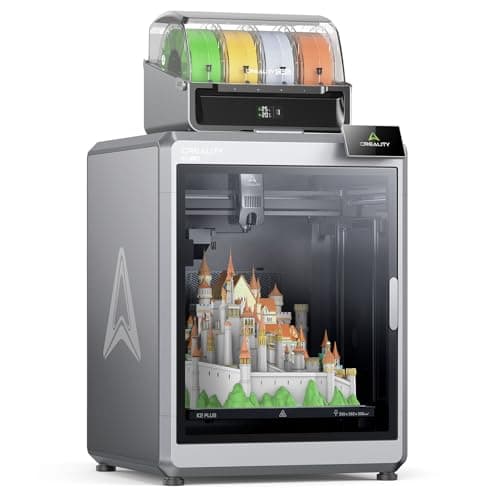
The Creality K2 Plus Combo is tailor-made for professional designers, small-scale manufacturers, or serious prosumers who demand the utmost versatility and capacity from their 3D printer. This buyer isn't deterred by a higher price tag of $1299 because they require specific advanced capabilities. Their needs extend beyond single-color prototyping to creating visually complex, multi-color models, leveraging the K2 Plus's support for up to 16 colors. Furthermore, printing with engineering-grade filaments like PC, Nylon, or Carbon Fiber composites is crucial, made possible by its 350°C nozzle, 120°C heated bed, and enclosed build chamber for temperature stability. The expansive 350x350x350mm build volume is also a key factor, enabling them to produce truly large, single-piece objects that might not fit on smaller printers. While the K1 Max offers comparable speed, this buyer values the K2 Plus's ability to handle a broader spectrum of materials and aesthetics, justifying the investment for its comprehensive feature set and superior material compatibility for professional-grade output. They are prepared for a slightly steeper learning curve to unlock its full potential.
Spec Comparison
9 specs compared
| Specification |  | 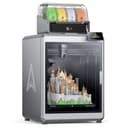 |
|---|---|---|
| Price | $719 | $1299 |
| Rating | 4.2(10.1k) | 4.2(727) |
| Build Volume mm | 299.974x299.974x299.974 | 350x350x350 |
| Max Print Speed mm S | 600 | 600 |
| Leveling Type | Auto | — |
| Printer Type | FDM | FDM |
| Enclosed | — | Yes |
| Bed Temp Max C | — | 120 |
| Filament Sensor | — | Yes |
| Nozzle Temp Max C | — | 350 |
| Multi Color Support | — | Yes |
Swipe horizontally to see all columns
Pros & Cons
Quick overview of strengths and weaknesses
Comgrow Creality K1
- 600mm/s print speed significantly cuts job time.
- AI Lidar scans first layer, prevents print failures.
- Large 300x300x300mm build volume fits big models.
- Hands-free auto-leveling simplifies bed setup.
- AI functions add complexity to troubleshooting.
- Large footprint requires significant workspace.
- Reliance on AI may limit manual control options.
Creality K2 Plus
- 600mm/s print speed for rapid part production
- 350x350x350mm build volume supports large parts
- Prints up to 16 colors with multiple CFS units
- 350C nozzle prints engineering-grade filaments
- Max 16 colors needs purchase of 3 additional CFS units
- High-temp materials may require external ventilation
- Complex system may have a steeper user learning curve
Frequently Asked Questions
Common questions about this comparison
What is the main difference in build volume between the K1 Max and K2 Plus?
The K2 Plus offers a 350x350x350mm build volume, larger than the K1 Max's 300x300x300mm. This allows the K2 Plus to accommodate bigger parts or more prints in a single batch, providing greater design flexibility for larger objects.
Can both printers print at 600mm/s?
Yes, both the Comgrow Creality K1 Max and the Creality K2 Plus Combo are capable of achieving an impressive 600mm/s printing speed, making them highly efficient for rapid production and quick project completion. They share this core speed advantage.
Which printer is better for multicolor printing?
The Creality K2 Plus Combo is explicitly designed for multicolor printing, supporting up to 16 colors with multiple CFS units. The K1 Max is primarily a single-color printer, making the K2 Plus superior for aesthetic complexity.
How do the AI features differ between the two models?
The K1 Max features AI Lidar to scan the first layer for optimal adhesion and prevent failures, while the K2 Plus has a dual AI camera system for general print failure detection and monitoring throughout the printing process. Both enhance reliability.
Is the K2 Plus worth its higher price?
The K2 Plus's $1299 price covers a larger build volume, multi-color capability, higher temperature printing for advanced materials, and an enclosed design. For users needing these specialized features, its cost is justified, offering professional-grade versatility.
Which printer is more suitable for engineering filaments?
The Creality K2 Plus Combo is better for engineering filaments due to its enclosed chamber, higher nozzle temperature (350°C), and higher bed temperature (120°C), allowing it to handle materials like ABS or PC with greater success and stability.
Related Comparisons
Similar products people compare
Explore Other Categories
Popular comparisons across the site


Ask AI
Get instant answers about specs
Get the Deets
Ask our AI assistant
Ask Deets anything!