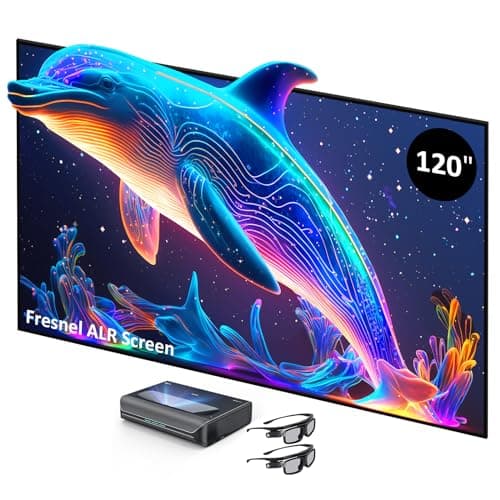
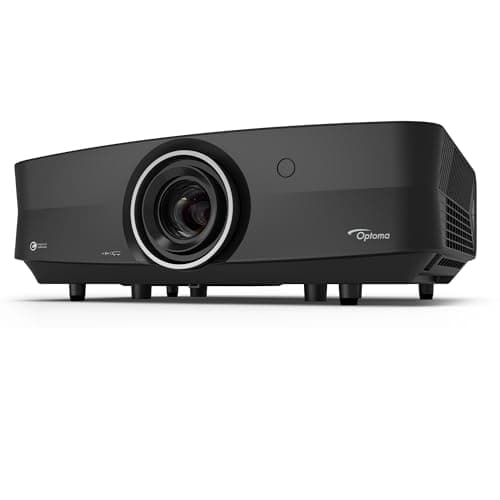
Our Verdict
NexiGo NexiGo Aurora Pro Wins
While the Optoma UHZ68 boasts a higher 4500 lumens brightness compared to NexiGo's 2400 lumens, the bundled ALR screen significantly enhances the NexiGo's perceived brightness and contrast. The Optoma UHZ68 is the better pick for environments with uncontrollable ambient light or for users who already own a premium sound system and prefer a standard throw projector.
Bottom Line: NexiGo NexiGo Aurora Pro is the better choice. While the Optoma UHZ68 boasts a higher 4500 lumens brightness compared to NexiGo's 2400 lumens, the bundled ALR screen significantly enhances the NexiGo's perceived brightness and contrast.
In-Depth Analysis
How they compare in practice
The NexiGo Aurora Pro and Optoma UHZ68 both offer compelling 4K laser projection experiences, but cater to slightly different user priorities. The most significant differentiator is the NexiGo's true Native 4K resolution against the Optoma's 4K Pixel Shift. For picture purists, NexiGo delivers a sharper, more defined image where every pixel counts. This is particularly noticeable with fine details and text, offering a genuine 3840x2160 pixel structure. In terms of brightness, the Optoma UHZ68 clearly dominates with 4500 ANSI lumens, almost double the NexiGo Aurora Pro's 2400 lumens. This makes the Optoma a stronger contender for rooms with significant ambient light. However, the NexiGo smartly bundles a 120-inch 85% ALR (Ambient Light Rejecting) Fresnel screen. This specialized screen is designed to reject overhead and side light, dramatically improving perceived brightness and contrast in non-darkened rooms, effectively mitigating a substantial portion of its lumen deficit in real-world viewing conditions. Without an equivalent screen, the Optoma's higher lumens might be diluted by light reflections. The NexiGo also stands out for its integrated home theater solution. Its 60W speaker system with Dolby Atmos support means users can achieve impressive audio without needing external components, providing a true plug-and-play experience. The Optoma, while offering excellent visuals and features like HDMI 2.1 and ALLM for gaming, necessitates an external audio system, adding to the total cost and setup complexity. Furthermore, the NexiGo's ultra-short throw design allows it to be placed directly against a wall, saving space, whereas the Optoma is a traditional throw projector requiring more distance from the screen.
Key Differences
The most significant spec differences at a glance
Brightness Ansi Lumens
47% lessAdvantages
Where each product wins

Optoma
- Brightness Ansi Lumens: 47% higher (2400 vs 4500)
Which to Pick for Your Situation
Concrete scenarios with a clear recommendation
For a dedicated dark home theater room
NexiGoThe NexiGo Aurora Pro's Native 4K resolution and included 120-inch ALR screen deliver superior detail and contrast in controlled lighting, making the most of its true 4K output.
For a living room with moderate ambient light
OptomaThe Optoma UHZ68's 4500 ANSI lumens provide significantly higher brightness for overcoming ambient light, ensuring a vibrant image even in brighter environments.
For a complete, out-of-the-box home cinema experience
NexiGoThe NexiGo Aurora Pro includes a 120-inch 85% ALR Fresnel screen and a powerful 60W Dolby Atmos sound system, offering a comprehensive solution right away.
For serious gamers prioritizing connectivity
OptomaThe Optoma UHZ68 features HDMI 2.1 and ALLM (Auto Low Latency Mode), specifically designed for low latency gaming experiences.
Who Should Buy Which?
Find the right product for your needs

Buy NexiGo if...
Aurora Pro Ultra Short Throw 4K Tri-Color
The NexiGo Aurora Pro is ideal for the discerning home theater enthusiast who desires a premium, complete, and convenient entertainment package. This buyer prioritizes true Native 4K resolution, seeking the sharpest possible image fidelity for movies and high-quality content. They will appreciate the included 120-inch 85% ALR Fresnel screen, which not only saves them the hassle and cost of choosing a separate screen but also enhances the projector's 2400 lumens brightness in typical living room settings. Furthermore, the powerful 60W integrated audio system with Dolby Atmos support means they don't need to invest in an external sound system immediately, offering a remarkable out-of-the-box immersive experience. This buyer values a streamlined setup, benefiting from the ultra-short throw design that eliminates long cable runs and complex mounting. While they accept a lower raw lumen count, they understand the ALR screen effectively compensates for it.

Buy Optoma if...
UHZ68
The Optoma UHZ68 is perfect for the home cinema aficionado who prioritizes sheer brightness and flexibility, and likely already possesses or plans to acquire a high-end external audio system. This buyer often has a larger viewing space, potentially with significant ambient light where the projector's 4500 ANSI lumens can truly shine, delivering a vivid and impactful image even without a fully darkened room. They might prefer the standard throw flexibility for placement, opting for a ceiling mount or specific throw distance tailored to their room dimensions. Gamers are a key demographic for the UHZ68, thanks to its explicit mention of HDMI 2.1 and ALLM features, promising a low-latency, smooth gaming experience that competitive players demand. This buyer is less concerned about true Native 4K versus 4K Pixel Shift, valuing the overall brightness and color accuracy (90%+ DCI-P3 color gamut) for a cinematic feel.
Spec Comparison
6 specs compared
| Specification |  |  |
|---|---|---|
| Rating | — | — |
| Brightness Ansi Lumens | 2400 | 4500 |
| Native Resolution | Native 4K | 4K Pixel Shift |
| Hdr Support | Yes | Yes |
| Light Source | Laser | Laser |
| Speaker Watts | 60W | — |
| Contrast Ratio | 3000:1 | — |
Swipe horizontally to see all columns
Pros & Cons
Quick overview of strengths and weaknesses
NexiGo Aurora Pro Ultra Short Throw 4K Tri-Color
- Native 4K resolution output
- >3000:1 native contrast with dynamic dimming
- Supports Dolby Vision and HDR10+ content
- 120-inch 85% ALR Fresnel screen included
- Ultra Short Throw requires meticulous setup
- Bundled 120-inch screen is non-adjustable size
- Active 3D glasses require power and may flicker
Optoma UHZ68
- 4500 lumens ensures very bright 4K UHD display.
- Dolby Vision/HDR10+ support for high contrast.
- 90%+ DCI-P3 color gamut for cinematic accuracy.
- HDMI 2.1, ALLM enable low latency gaming.
- Resolution achieved via 4K pixel shift.
- External audio system required for full sound.
Frequently Asked Questions
Common questions about this comparison
What is the key difference in resolution between the two projectors?
The NexiGo Aurora Pro offers Native 4K resolution, meaning a true 3840x2160 pixel display. The Optoma UHZ68 uses 4K Pixel Shift technology, which projects two distinct 1920x1080 frames rapidly to achieve a perceived 4K image.
Which projector is brighter for viewing in rooms with lights on?
The Optoma UHZ68 has a higher brightness of 4500 ANSI lumens, making it generally better for brighter rooms. However, the NexiGo's included 120-inch 85% ALR Fresnel screen significantly helps it perform well in ambient light conditions too.
Do either of these projectors support advanced HDR formats like Dolby Vision?
Yes, both the NexiGo Aurora Pro and the Optoma UHZ68 support Dolby Vision and HDR10+ content, ensuring a wide dynamic range and accurate color reproduction for compatible media.
What kind of audio experience can I expect from each projector?
The NexiGo Aurora Pro includes a robust 60W integrated audio system with Dolby Atmos support, offering immersive sound out of the box. The Optoma UHZ68 requires an external audio system for sound.
Is the included screen with the NexiGo important?
Yes, the 120-inch 85% ALR Fresnel screen significantly improves picture quality by rejecting ambient light. This enhances contrast and perceived brightness, especially crucial for the 2400-lumen NexiGo in non-darkened rooms.
Related Comparisons
Similar products people compare
Explore Other Categories
Popular comparisons across the site

Ask AI
Get instant answers about specs
Get the Deets
Ask our AI assistant
Ask Deets anything!